 Easter Sale | 16% OFF $19.95+ (Code: ES16) • 21% OFF $69.95+ (Code: ES21)
Epson ET-3958 Reviews: Is This EcoTank Model Worth It?
If you’ve been considering Epson printers recently, the Epson ET-3958 may come to your attention. This latest EcoTank all-in-one printer is designed for home and home office use. In this blog post, we’ll explore the machine’s printing performance and help you determine if it’s right for your home.
I. First Impression
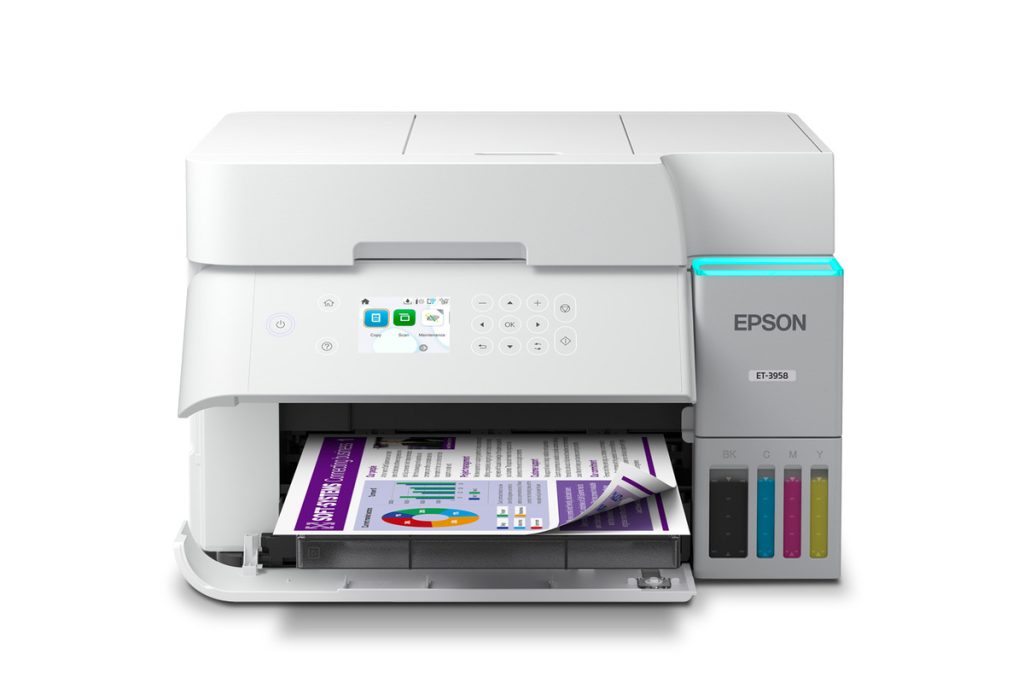
Upon opening the box, the first thing you’ll notice is that this printer is manageable. When not in use, it measures 14.8 inches wide, 13.7 inches deep, and 9.4 inches high, taking up minimal space on your desk. It’s professional enough for a home office and blends seamlessly into any living room.
Furthermore, its 2.4-inch color screen is clear, easy to read, and user-friendly. You can get started without even needing to consult the manual.
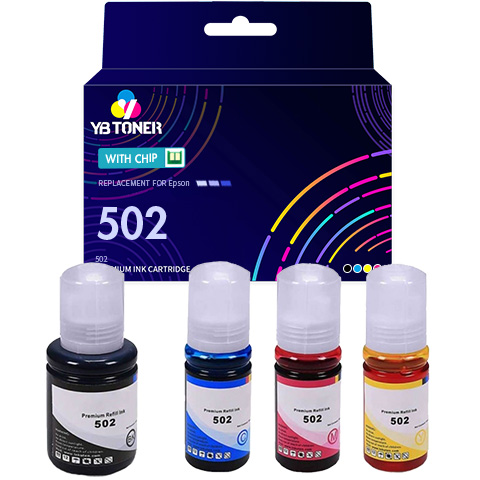
Compatible Epson 502 Ink 4-Pack – Ultra High Yield: 1 Black, 1 Cyan, 1 Magenta, 1 Yellow
- Get Crisp Prints and Vibrant Colors Every Time
- Only a Fraction of the Price of OEM Products
- Same-Day Shipping, Delivered Within 1-3 Business Days
- 30-Day Money Back Guarantee & 2-Year Warranty
- Sale Price: $25.95 (Subscribe to Get Extra 15% Discount)
II. Key Features of the Epson EcoTank ET-3958 Printer
Before diving into the details, let’s quickly take a look at the features of ET-3958:
| Feature | Specification |
| Functions | Print / Copy / Scan |
| Duplex Capabilities | Print / Copy / Scan |
| Replacement Ink | Epson 502 series |
| Print Speed | 18 ppm black / 9 ppm color |
| Print Resolution | 4800 x 1200 dpi |
| Borderless Printing | Up to 8.5″ x 11″ |
| Supported Paper Sizes | 3.5″ x 5″ up to Legal (8.5″ x 14″) |
| Connectivity | Wi-Fi 5, Ethernet, USB, Wi-Fi Direct |
| Display | 2.4″ color LCD |
| Automatic Document Feeder | 30 sheets with duplex scanning |
1. Print Performance and Speed
So how fast is this printer?
As a home printer, it’s quite fast. Based on ISO standards, it prints approximately 18 pages per minute for black and white documents and approximately 9 pages per minute for color documents. Even better, thanks to Epson’s Heat-Free PrecisionCore technology, it requires no warm-up time. Press the print button, and the Epson printer starts printing immediately.
If you want to save paper, the printer can automatically print on both sides. That runs at about 7 pages per minute for black and 5 for color.
Print quality is where this printer really shines. With a resolution of 4800 x 1200 dpi, text comes out nice and sharp. Color photos look vibrant and detailed. You can even print borderless photos up to letter size, which means no white edges around your pictures. That’s perfect for family photo projects or school assignments.
2. Scan and Copy Functions
The scanner is straightforward and gets the job done. It uses a CIS sensor with a hardware resolution of 1200 x 2400 dpi. For most things, like scanning documents or even photos, that’s more than enough. If you need higher resolution, you can go up to 9600 dpi with interpolation.
The 30-sheet automatic document feeder is very time-saving. It can scan both sides of a two-sided document in one pass. You don’t have to stand there flipping pages. Just load up the stack and let it do its thing. It can handle documents up to Legal size (8.5 x 14 inches).
Copying is also simple and flexible. This printer copies at a speed of 11.5 pages per minute for black and 5.7 pages per minute for color. You can make anywhere from 1 to 99 copies without needing a computer.
In addition, this printer has some useful built-in features:
- ID copy: scans both sides of an ID card and puts them on one page
- Reduce or enlarge from 25% to 400%
- Remove shadows or punch holes from copies
- Borderless copying
If you’re copying a multi-page document, the printer can collate up to 60 pages. That means it will sort them in the right order automatically.
3. Paper Handling
This printer can handle all kinds of paper, which is nice when you have different projects going on.
The main paper tray holds 250 sheets of plain paper. For most families, that’s a couple weeks worth of printing, maybe more. You won’t be refilling it constantly.
There’s also a separate photo paper tray that holds up to 20 sheets of photo paper. It supports 4×6, 5×7, 8×10, and letter-size photo paper. So, if you want to print some family photos, it’s always ready. Need to print envelopes? A breeze. It holds up to 10 No. 10 envelopes at a time.
As for paper sizes, you can print on almost any paper size, from 3.5 x 5 inches to legal size. This includes A4, A6, half letter, executive, and more. Paper types include plain paper, bright white, various glossy photo papers, matte presentation paper, and envelopes.
The output tray holds 30 sheets, which is sufficient for most printing needs. For larger projects, you might need to empty it a few times, but that’s not a big deal.
4. Ink System and Cost Advantages
Let’s talk about the main reason people look at EcoTank printers: the ink situation.
Here’s the deal. Depending on where you buy the ET-3958, you get different amounts of ink in the box:
- New units come with three 127 mL bottles of black ink and one 70 mL bottle each of cyan, magenta, and yellow.
- Refurbished units from Epson’s official store come with one black bottle and one of each color.
With the new unit configuration, you can print up to 23,600 pages in black and 5,500 pages in color. That’s a lot of printing. If your family prints about 150 pages a month, that ink could last you up to three years.
Even with the refurbished configuration, you’re looking at about 8,500 black pages. Still plenty for most families.
When you eventually run out, replacement Epson 502 bottles are really affordable. Epson says you can save up to 90% compared to buying individual ink cartridges. That adds up fast if you print a lot.
The ink bottles have a clever design called EcoFit. Each bottle only fits into its matching color tank. So you can’t accidentally put magenta ink in the cyan tank. No mess, no stress, no mix-ups. The ink tanks are see-through, so you can always see how much ink you have left.
There’s also a user-replaceable maintenance box that catches excess ink from cleaning cycles. You’ll need to replace it every once in a while, but it’s not expensive and it’s easy to do.
5. Wireless and Smart Features
These days, a printer needs to work with all your devices. The ET-3958 does that well.
It has dual-band Wi-Fi, Ethernet if you want a wired connection, and a USB port. It also supports Wi-Fi Direct, which lets you print directly from a device without going through your home network. That’s handy when you have guests over or if your internet is acting up.
Mobile printing works great. The Epson Smart Panel app is available for both iPhone and Android. You can print, scan, and check on the printer right from your phone. The app also lets you scan directly to cloud services like Google Drive and Dropbox.
If you don’t want to use an app, that’s fine too. The printer supports Apple AirPrint, Mopria Print Service, and Android’s default printing. So you can just hit print from your device and it works.
For the tech fans out there, the ET-3958 works with Amazon Alexa. You can set up voice-activated printing. Just say “Alexa, print my shopping list” and it happens. You’ll need to register for Epson Connect and link your accounts first, but once that’s done, it’s pretty cool.
The 2.4-inch color screen isn’t a touchscreen. You navigate with physical buttons. But it’s straightforward and easy to use. Setting up Wi-Fi, checking ink levels, and running maintenance tasks are all simple.
III. Epson ET-3958 Printer Pros and Cons
Pros:
- Extremely low running costs. The included ink lasts up to three years, and replacement bottles save 90% versus cartridges.
- High page yields. You get up to 23,600 black pages and 5,500 color pages per set with new units.
- Excellent print quality. The 4800 dpi resolution produces sharp text and vibrant photos.
- Versatile media handling. It supports various paper sizes and types, including borderless photos.
- Automatic document feeder with duplex scanning. The 30-sheet ADF scans both sides in one pass.
- Robust wireless features. You get dual-band Wi-Fi, Wi-Fi Direct, mobile apps, and Alexa support.
Cons:
- Print speed is moderate. At 18 ppm black, it’s fine for home use but not for high-volume offices.
- No fax capability. This isn’t a concern for most families, but worth noting if you need it.
- Initial setup takes time. Priming the ink system takes about 10 to 15 minutes, but it’s a one-time process.
IV. Epson ET-3958 Ink: Epson 502 Ink
The ET-3958 uses Epson 502 ink bottles. Here are the basics:
- Black bottle: 127 mL, prints about 8,500 pages
- Cyan, Magenta, Yellow bottles: 70 mL each, prints about 6,500 pages per color
These numbers are based on ISO standards, so your actual mileage may vary depending on what you print.
New printers come with three black bottles and one of each color. Refurbished units from Epson’s official store come with one black bottle and one of each color.
When you need more ink, you can buy genuine Epson bottles or compatible Epson 502 from other brands. Both work fine. Just make sure whatever you buy is made for this printer.
V. Similar Printer Comparisons
1. Epson 3958 vs 3950
The ET-3958 and ET-3950 are very similar printers. They have the same print speeds, paper handling, scanner, and connectivity options. So in terms of what they can do day to day, they’re almost identical.
The real difference comes down to value. A refurbished ET-3958 from Epson’s official store costs $179.99. A new ET-3950 sells for $329.99.
Unless you have a strong reason to buy a brand-new printer, the refurbished ET-3958 is the better deal by far. You get the same core features for almost half the price.
2. Epson 3958 vs 4958
Both printers use the same print engine and paper handling. They have the same automatic document feeder with duplex scanning. The replacement ink is the same too.
The ET-4958 adds fax and a nicer touchscreen. The ET-3958 gives you more black ink out of the box if you buy a new unit.
So which should you choose? If you don’t need fax, the ET-3958 offers better value. If fax is important for your home office, or you really want that touchscreen experience, spend the extra money on the ET-4958.
VI. The Bottom Line
The Epson EcoTank ET-3958 is one of the most cost-effective ink tank printers for home users. It boasts extremely low per-page printing costs and meets the needs of most users: printing, copying, scanning, and duplex printing. Compared to other models in the same series, the ET-3958’s advantages are obvious. It offers better value than the ET-3950, especially when choosing a refurbished unit. Unless you absolutely need faxing or touchscreen functionality, it’s more suitable than the more expensive ET-4958. For busy families, this printer can meet their needs for schoolwork, homework, or occasional work documents.

You mention that “There’s also a user-replaceable maintenance box that catches excess ink from cleaning cycles. You’ll need to replace it every once in a while, but it’s not expensive and it’s easy to do.”
What about resetting the “maintenance box”, the Waste Ink Pad Counter? This must be reset for the printer to work again after the counter determines that the Ink Pad needs replacing and disables the printer. Can it be reset? How is this accomplished?
I’m having great difficulty getting the Counter reset on my Epson ET-2800. And so is the repair shop that I have taken it to. They have not succeeded after having my printer for over a week.
This is a very important question that will affect my decision to purchase or not.
Thank you!